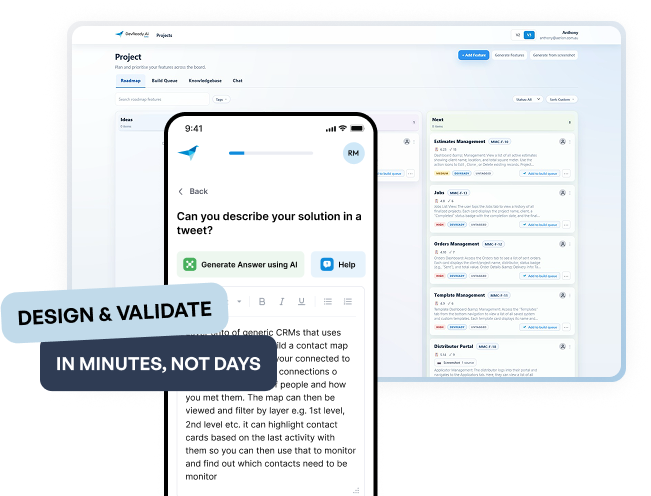
- The planning layer before AI coding
Give your AI agent the details behind your idea.
Turn your next feature idea into a plan with the users, rules and expected outcomes your AI coding agent needs to understand.
- Start with your idea, in your own words
- Create the details yourself or with AI
- Take a clear feature plan into your next build
Why planning matters
What does “add booking” actually mean?
A useful feature plan answers the decisions an AI agent cannot safely guess: who it serves, what rules apply and what a successful result looks like.
1
Who is it for?
Name the people who will use this feature and what each person needs to do.
2
Rules and limits
Set the conditions, boundaries and exceptions the feature must follow.
3
Expected outcome
Describe what the person should be able to do and what the system should show or change.
4
Edge cases
Call out what should happen when details are missing, a limit is reached or the usual flow changes.
How It Works
Bring your feature. Shape the details.
Add features, requirements, rules and acceptance criteria yourself, or let AI generate a starting point. Review, edit and trim the plan to suit your build.
Describe the problem
Start with your feature
Describe the feature you want to add or improve in your app.
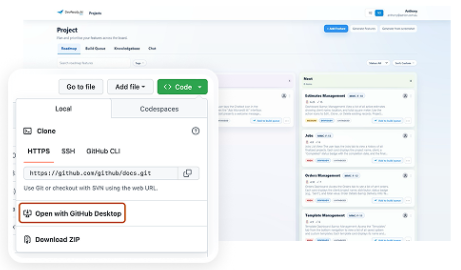
Create the details your way
Add requirements, rules and acceptance criteria yourself, or let AI generate a starting point to guide you.
Use your plan with your AI agent
Review and refine your plan
Review and refine your feature plan, then hand the detail-rich plan to your AI coding agent through a supported handoff.
Before and After
Plan the feature before you ask your agent to build it.
Start with an idea like “add bookings”. Then work through the people, decisions and checks your agent needs before building.
Your starting idea
A feature name sets direction. The people, rules and expected behaviour still need decisions.
Booking feature idea
- Add booking to my app.
A few decisions to make
- Who can book, and for whom?
- Which dates and times are available?
- How can a booking be changed or cancelled?
- What happens if a time slot becomes unavailable?
- What confirmation should the person receive?
- What happens after a cancellation?
- How will you know the feature works as expected?
What usually happens
- Requirements emerge while coding
- Prompts become longer and longer
- Features behave differently
- Rework becomes part of the build
A booking plan, worked through
A feature idea becomes a clearer brief when you define who it serves, the rules it follows and how it should behave.
Booking plan example
- Who can create a booking: a signed-in customer.
- Availability: show only bookable dates and times.
- Cancellation rule: decide the cutoff and any fees.
- After cancellation: return the slot to availability and update the booking status.
- Confirmation: show the date, time and next steps.
- Acceptance check: after cancellation, the slot can be booked again.
The detail your AI agent receives
- Who can create and manage a booking
- Booking availability rules and time boundaries
- Cancellation and rescheduling behaviour
- Expected results and acceptance checks
- Important edge cases and what the system should do
- A reviewed feature brief ready for your AI coding agent
What your AI coding agent receives
- Clear feature descriptions
- What each person needs to do
- How to tell the feature works
- What is ready to build
- A complete feature brief for your AI coding agent
- Built for founders
Hear from people who have planned with DevReady
People who have used DevReady describe how it helped them organise ideas, surface blind spots and decide what to do next.
Pricing
Try the planning process on one real app.
Start with one project and plan up to five features free. See whether the process helps you explain your app and decide what to build next.
Beginner
Try it free
Free
$0to start
Try the workflow on one real app and review the plan before you choose what to build next.
- 1 project
- Up to 5 features
- 1 user
- MCP handoff or builder-ready brief for included features
- Structured planning and refinement inside the trial scope
Real project
Solo Monthly
Most Popular
$29/project /month
- 1 active project
- 1 included user
-
Unlimited refinement within that project*
*Unlimited refinements are subject to our Fair Use Policy to ensure a fast and reliable experience for all users. - GitHub import and current-state mapping
- Feature slicing, logic, edge cases, and MCP-connected or manual builder handoff
Committed project
Solo Annual
Best value
$249/project /year
- 1 project
- 1 included user
-
Unlimited refinement within that project*
*Unlimited refinements are subject to our Fair Use Policy to ensure a fast and reliable experience for all users. - Everything in Solo Monthly
- Lower effective monthly cost you commit

Move from plan to build
Take the feature plan into your AI coding tool and keep refining it as your product takes shape.
FAQs
Questions about planning your next feature
Quick answers about building a more complete feature plan with your AI coding agent.
Do I need software or product experience?
No. Describe your feature in your own words. Add the details yourself or use AI to generate a starting point, then review and edit the plan.
What does planning an app mean?
Planning means deciding who the app is for, what a feature should do, what rules it follows and how you will check the result. DevReady helps you work through those decisions one step at a time, then turns them into a plan your builder can follow.
How is DevReady different from asking AI to build my app?
An AI builder can turn a prompt into an app. DevReady helps you work through the people, rules, exceptions and expected results a short prompt may leave unclear. Use that plan to guide your next build and check whether the result does what your team needs. This is all done in a proven repeatable way that helps AI builders deliver better quality first-time
Can I use DevReady with the AI builder I already use?
Yes. Use Devready.ai to plan then ahnd over to your own AI coding tool or developer you already work with. DevReady can pass structured context through MCP when supported, provide a builder-ready brief to share or connected directly to lovable using our Lovable Agent Builder
What if I have already started building?
Yes. Start with what your app does today and what you want to improve. DevReady helps you map the current workflow, spot gaps and plan the next feature without starting over. GitHub import is available on paid plans for projects with a connected repository.
What do I get in the free plan?
The free plan lets you try the workflow on one real project: one project, up to five features and one user. It includes an MCP handoff or builder-ready brief for those features, plus structured planning and refinement within the trial scope.
What happens after I have a plan?
Review the feature plan, then use it to guide your AI builder or developer. It sets out what each feature should do, the rules to follow and how you can check the result. You stay in control and can update the plan as you learn.
Does DevReady build the feature for me?
No. DevReady helps you prepare the plan and capture all the unknown details, your AI coding tool uses those details to build. You stay in control of what the feature should do and review the plan before handing it off.
How long does it take to plan a project?
It depends on your idea and how much detail you need to decide. Start with one feature and work through it step by step; you can refine the plan as your understanding grows.
Your next feature starts with a clearer plan.
Bring the feature you are working on and shape the details before you build.