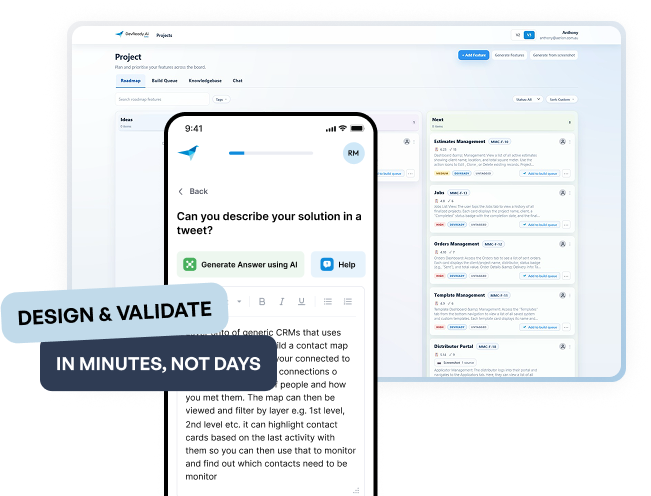
- The planning layer before AI coding
Adding notifications to your app?
Work out who needs to know, what triggers a notification and what happens next. Use DevReady.Ai to turn your next feature into a clearer plan for your build.
- Start with your idea, in your own words
- Create the details yourself or with AI
- Take a clear feature plan into your next build
Why planning matters
“Notify the user” is a starting point.
A useful notification depends on what happened, who needs to know and how they will receive it.
1
Trigger
What change should send a notification?
2
Recipient
Who needs to receive it?
3
Channel
Should it appear in the app, push notification, by email, or by sms?
4
Timing
Should it be sent immediately or later or on a schdule?
How It Works
Bring your feature. Shape the details.
Add features, requirements, rules and acceptance criteria yourself, or let AI generate a starting point. Review, edit and trim the plan to suit your build.
Describe the problem
Start with your feature
Describe the feature you want to add or improve in your app.
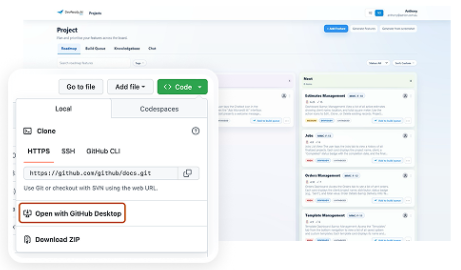
Create the details
Create the details your way
Add requirements, rules and acceptance criteria yourself, or let AI generate a starting point to guide you.
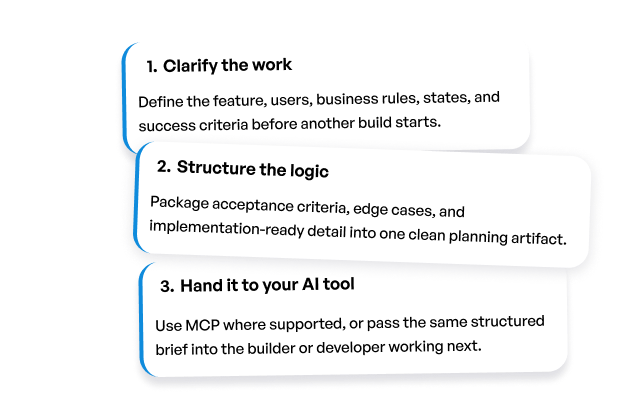
Share the plan with your builder
Review and refine your plan
Review, edit and trim the details, then use the plan with your AI coding tool or developer.
Before and After
Turn a short request into a clearer plan.
A feature plan records what should happen, who it is for and how you will check the result.
The first request
Start with an idea. Fill in the decisions later.
A typical starting prompt
- Notify the user person when a status changes.
Questions still to answer
- What status change triggers the notification?
- Can it be triggered from more than one status?
- Who should receive it?
- Where should the message appear?
- When should it be sent?
- What should the message say?
- How will you check it works?
What usually happens
- Requirements emerge while coding
- Prompts become longer and longer
- Features behave differently
- Rework becomes part of the build
A clearer plan
Clarify the people, rules and expected result before the next build.
Example of a planned feature
- When the status changes to Active
- Send it to the Admin User Group
- The delivery channel
- Send push notification immediately and da daily summary
- The message content
- Monitor send records with Push Notification and Email Server
What the plan makes clear
- Each person’s role is clear
- Exceptions have an agreed path
- Notification rules are written down
- Each feature has a clear check
- Access is defined for each role
- What happens next is documented
What to hand off to your builder
- Clear feature descriptions
- What each person needs to do
- How to tell the feature works
- What is ready to build
- A clear handoff for your AI builder
Your Starting Point
Notifications are just one example.
Already building an app? Bring the next feature you want to add or improve.
Feature example
Notifications
Plan who should be informed and when.
- Choose the event
- Identify the recipients
- Define the message
Feature example
Bookings
Work through bookings, changes and cancellations.
- Define who can book
- Plan changes and cancellations
- Decide what to check
Feature example
Team access
Clarify who can access your app and what they can do.
- Built for founders
Hear from people who have planned with DevReady
People who have used DevReady describe how it helped them organise ideas, surface blind spots and decide what to do next.
Pricing
Try the planning process on one real app.
Start with one project and plan up to five features free. See whether the process helps you explain your app and decide what to build next.
Beginner
Try it free
Free
$0to start
Try the workflow on one real app and review the plan before you choose what to build next.
- 1 project
- Up to 5 features
- 1 user
- MCP handoff or builder-ready brief for included features
- Structured planning and refinement inside the trial scope
Real project
Solo Monthly
Most Popular
$29/project /month
- 1 active project
- 1 included user
-
Unlimited refinement within that project*
*Unlimited refinements are subject to our Fair Use Policy to ensure a fast and reliable experience for all users. - GitHub import and current-state mapping
- Feature slicing, logic, edge cases, and MCP-connected or manual builder handoff
Committed project
Solo Annual
Best value
$249/project /year
- 1 project
- 1 included user
-
Unlimited refinement within that project*
*Unlimited refinements are subject to our Fair Use Policy to ensure a fast and reliable experience for all users. - Everything in Solo Monthly
- Lower effective monthly cost you commit

Need a developer or PM later?
FAQs
Questions before your first plan
New to planning software? Start with the questions people ask before they turn an idea into an app for their team.
Do I need software or product experience?
No. Describe your feature in your own words. Add the details yourself or use AI to generate a starting point, then review and edit the plan.
What does planning an app mean?
Planning means deciding who the app is for, what a feature should do, what rules it follows and how you will check the result. DevReady helps you work through those decisions one step at a time, then turns them into a plan your builder can follow.
How is DevReady different from asking AI to build my app?
An AI builder can turn a prompt into an app. DevReady helps you work through the people, rules, exceptions and expected results a short prompt may leave unclear. Use that plan to guide your next build and check whether the result does what your team needs.
Can I use DevReady with the AI builder I already use?
Yes. Use the plan with the AI coding tool or developer you already work with. DevReady can pass structured context through MCP when supported, or provide a builder-ready brief to share.
What if I have already started building?
Yes. Start with what your app does today and what you want to improve. DevReady helps you map the current workflow, spot gaps and plan the next feature without starting over. GitHub import is available on paid plans for projects with a connected repository.
What do I get in the free plan?
The free plan lets you try the workflow on one real project: one project, up to five features and one user. It includes an MCP handoff or builder-ready brief for those features, plus structured planning and refinement within the trial scope.
What happens after I have a plan?
Review the feature plan, then use it to guide your AI builder or developer. It sets out what each feature should do, the rules to follow and how you can check the result. You stay in control and can update the plan as you learn.
Will DevReady replace my development team?
No. DevReady helps you organise your thinking and prepare a clearer handoff. Your team or developer still brings technical judgment and builds the software; you can use the plan together to reduce guesswork.
How long does it take to plan a project?
It depends on your idea and how much detail you need to decide. Start with one feature and work through it step by step; you can refine the plan as your understanding grows.
Your next feature starts with a clearer plan.
Bring the feature you are working on and shape the details before you build.